
Trail camera not sending pictures? Troubleshooting, step by step
When a cellular trail camera stops sending pictures, the fault is in one of four places: the camera and its power, the SIM card and network, the sending settings, or the receiving end. This troubleshooting guide checks them in that order, starting with what is easiest to check.
The guide covers trail and security cameras that send pictures over the mobile network by email or MMS. It does not depend on the camera brand, or on the service where you view the pictures.
Facts checked on . Sources are listed at the end of each section.
Buying a camera? See what to check before you buy
Start here: three quick checks
Three checks tell you which step to read: is the picture on the memory card, does the camera show a network, and does a test email arrive.
- Is the picture on the memory card? Look at the card in the camera's playback view or on a computer. No new pictures: the camera isn't taking pictures, so go to Step 1. Pictures are there: the camera works but sending fails, so continue to the next check.
- Does the camera show a network? In setup mode, look for the operator's name and the signal bars on the screen. No name or no bars: go to Step 2.
- Does a test email arrive? From your own email, send a photo as an attachment to the same address the camera sends to. It arrives: the receiving end works, so go to Steps 3 and 4. It doesn't arrive: go to Step 5.
If you use Zeemage: The camera's target address is your feed email address. You find it under Settings > Camera settings. The test photo usually appears in the gallery within a few seconds, depending on the network connection.
Step 1: Camera and power
- Switch. The switch is in the ON position, not SETUP or TEST.
- Batteries. Replace all batteries at once with fresh ones. Weak batteries can still take a picture but fail to send it.
- Frost. In frost, use lithium batteries or an external battery.
- Antenna. The antenna is screwed on tight and points straight up.
- Memory card. The card is in place, unlocked and not full. Many cameras send only when the card works. Many cameras accept cards only up to a set size, for example 32 GB. Format the card in the camera.
- Screen and lights. Take a test picture. Write down any error text on the screen.
- Camera software. Install the maker's latest update.
More: Batteries and power
Step 2: SIM card and network
- SIM card. Activate a new SIM card before use. The plan is active and has data and credit left.
- PIN query. Turn the PIN query off in a phone before you put the card in the camera.
- Signal. Check the signal bars at the spot where the camera is. One or two bars can drop too low while the camera sends.
- Network. Check your operator's coverage map for the network your camera uses: 2G, 3G or 4G. A 3G-only camera can't connect where 3G has been shut down.
- Operator setting. If the card works in a phone but not in the camera, check the APN, the operator's connection setting.
More: SIM card and plan · Signal · Operator settings · 3G and 2G
Step 3: Sending settings in the camera
- Send mode. Instant sending is on, and the daily picture limit has not been reached.
- Sending method. Pictures go out as email over mobile data, or as MMS. An MMS reaches an email address as long as the operator supports MMS to email.
- Address. The recipient address is typed correctly, character by character.
- Picture size on a weak signal. Choose a smaller picture size, and send pictures instead of video. On a slow connection, sending a large picture can take more than half a minute, and the camera may give up without an error message.
Step 4: Sending email
- Find the mail server. It is in the camera's Email or SMTP settings. The SMTP server is the server the camera sends its email through.
- The maker's own server. Don't change it. If sending fails, update the camera software.
- Your own email account as the server. The camera signs in to your account. Many services require a separate app password for that. See Gmail and app password.
- Sign-in no longer accepted. Some email services no longer accept a camera's sign-in. Change the server then. See Sign-in no longer accepted.
Step 5: The receiving end
- The test email did not arrive. Compare the address typed in the camera with the correct address, character by character.
- Spam. Look in the spam folder. See Pictures go to spam.
- Storage full. A full mailbox does not receive messages. Delete old messages or get more storage.
- Attachment size. Email services limit the size of an attachment. A large video may never arrive.
If you use Zeemage: Compare the address with Settings > Camera settings. If the gallery shows an Image feed stopped tile, your plan's limit is reached. If pictures arrive under the wrong camera, check the camera's search string in Camera settings (field: String).
The trail camera suddenly stopped sending pictures
When the camera worked and nobody touched its settings, the cause is usually one of these five: the SIM plan, the power, the network, the email service's sign-in, or a full receiving end.
- The plan ran out. Prepaid credit, validity or the data allowance ended. See SIM card and plan.
- Batteries or frost. There is enough power to take a picture, but not to send it. See Batteries and power.
- The network changed. The operator shut down the network the camera uses, or the signal weakened. See 3G and 2G.
- The email service changed its sign-in. The service no longer accepts the camera's password. See Step 4.
- The receiving end is full. The mailbox storage or the camera cloud service's limit filled up. See Step 5.
If you use Zeemage: Zeemage warns you when 90 % of a plan limit is used. While the image feed is stopped, new files are not stored.
Trail camera batteries and power
Sending a picture takes much more power than taking it. That is why weak or cold batteries may still take pictures after sending has stopped working.
Trail camera takes pictures but won't send them: is it the batteries?
Often it is. The camera's cellular connection uses the most power. When the battery voltage drops too low, the camera can stop sending even though it still takes pictures. Replace all batteries at once, and don't mix old and new batteries or different types.
Trail camera batteries in cold weather
A lithium battery handles frost clearly better than an alkaline one. In TrailCamPro's measurement at −15 °C (5 °F), a lithium battery kept 97 % of its room-temperature capacity and an alkaline battery 33 %. In winter, use lithium batteries or an external battery.
| Battery type | Capacity left at −15 °C (5 °F) |
|---|---|
| Lithium (single-use) | 97 % |
| Rechargeable NiMH | 83 % |
| Rechargeable lithium-ion | 78 % |
| Alkaline | 33 % |
Source: TrailCamPro, Alkaline Battery Capacity Test (Cold Weather & High Current). A retailer's own measurement at a 245 mA load, undated. Checked 23 November 2026.
External battery: 6 V or 12 V?
An external battery must have the same voltage as the camera's power input. The voltage is printed next to the input or in the camera's manual. The wrong voltage can damage the camera. Check the polarity and the plug too.
| Camera | Battery | Step-down converter |
|---|---|---|
| 6 V camera | 6 V | Not needed. Connect directly. |
| 6 V camera | 12 V | Needed, 12 V to 6 V. Never connect a 12 V battery straight to a 6 V input. |
| 12 V camera | 12 V | Not needed. Connect directly. |
| 12 V camera | 6 V | Won't help, the voltage is too low. Choose a 12 V battery. |
Solar panel and mains power
Choose a solar panel made for your camera's voltage, with a battery of its own. Then the camera also runs at night. On mains power, use an adapter with the same voltage as the camera's power input. Some adapters are for indoor use only.
Why does my trail camera keep shutting off?
Start with the power. Test the camera with fresh batteries and no external power. If it works then, the external power supply is the fault.
SIM card and plan for a trail camera
A cellular trail camera needs a SIM card and a plan with mobile data, because it sends pictures over the mobile network. Without a SIM card, a camera only stores pictures on its memory card.
Which SIM plan for a trail camera?
Choose a plan with mobile data from the operator whose network is strongest at the camera's spot. Check that the plan works on the network your camera uses, for example 4G. Sending pictures by email needs only data. If you control the camera with text messages, the plan must include SMS too.
Does a trail camera work with a prepaid SIM card?
Yes, when the plan has data and credit. A prepaid plan expires if it is not topped up in time. Make a note of the last top-up date.
How do I turn off the SIM card's PIN query?
Put the SIM card in a phone and turn off the SIM card lock in the phone's settings. Then move the card back to the camera.
The trail camera doesn't recognise the SIM card
Switch the camera off before you insert the card. Check the card size and which way it faces, turn the PIN query off, and test the card in a phone. If the card works in a phone but not in the camera, see Operator settings.
How much data does a trail camera use?
Data use depends on the size and number of the pictures sent. Videos use more data than pictures. A smaller sending size saves data, and the full-size picture stays on the memory card.
If you use Zeemage: Zeemage needs no SIM card or plan of its own. Your camera keeps the plan it already has.
Signal and network connection
Late or missing pictures usually mean a weak signal at the camera's spot, not a broken camera. Check the place, the terrain and the position of the antenna.
The trail camera finds no network or keeps searching
Check the SIM card first. Then check that the antenna is tight and that your operator has coverage at the camera's spot. A camera can't connect if the network it uses has been shut down in the area. Move the camera, or try another operator's card.
Why does my camera send only some pictures, or send them late?
The cause is probably a weak signal. The signal varies from day to day, so a good result during setup does not mean every picture gets through. On a weak signal, a large picture or video can take so long that the camera gives up without an error message. Choose a smaller sending size.
How to improve the signal
Check the signal bars before you leave the spot. The signal is often weaker in hollows and dense forest. Keep the antenna upright. An external antenna can help: mount it as high as you can, and compare the bars before and after. If the signal stays weak, move the camera.
Does a weak signal drain the batteries?
Yes. On a weak signal, the camera keeps searching for the network and retrying, and sending takes longer. All of that uses power.
APN: operator settings in a trail camera
The APN, or access point name, tells the camera how to reach the internet through the operator's network. If the SIM card works in a phone but the camera doesn't send, the APN is the first setting to check.
What goes in the camera's APN setting?
Many cameras set the APN themselves from the SIM card. If yours doesn't, choose the manual setting and type the APN your operator gives. The user name and password usually stay empty. Operators publish the APN on their support pages.
Does the operator block email from the camera?
Many operators block the unencrypted email port 25 to fight spam. Use port 587 or 465 with encryption on.
The camera stopped sending after a change of operator
The new SIM card needs the new operator's APN, and for MMS sending the new operator's MMS settings too. If the camera sent through the old operator's mail server, that server may no longer work. Test sending, and change the server if needed.
Camera near a border or with a foreign SIM card
Check the plan's roaming settings. If the camera has a roaming setting, turn it on for a foreign SIM card.
3G and 2G cameras
A camera that uses only a network that has been shut down can't connect, and no setting fixes that. Many operators have shut down their 3G networks. A new camera should be a 4G model.
The US Federal Communications Commission (FCC) states that carriers are retiring their 3G networks, and that the change affects other devices that use 3G as well as phones. Ask your operator which networks run at the camera's spot, and check which networks your camera supports.
Does a 2G trail camera still work?
A 2G camera can connect where a 2G network is still running. 2G is slow: some cameras send only a small preview picture on it.
Sources: FCC, Plan Ahead for Phase Out of 3G Cellular Networks and Service. · Traficom (Finland), Development of Finnish mobile networks: 2G, 4G and 5G networks are in operation in Finland. · Checked 23 November 2026.
How a trail camera sends email
The camera needs two things: a recipient address, and a mail server (SMTP) that the message goes out through. When pictures don't arrive, the fault is most often in signing in to the server, not in the recipient address.
| Sending server | What you set in the camera | When it fits |
|---|---|---|
| The camera maker's server | Usually preset. You only add the recipient. | When the camera already works this way. |
| Your own email account, for example Gmail | Server, port, the account's address and an app password | When there is no maker's server, or it doesn't work. |
| Your operator's or camera cloud service's server | The settings the service gives | When your own operator or cloud service offers one. |
Don't change a sending setup that works
If the camera sends pictures now, don't change its server settings. Consider a change only when sending has problems. Write the old settings down before you change anything: the maker's own settings can't always be restored without a camera software update.
If you use Zeemage: You don't need to change the way the camera sends now. Add your feed email address to the camera as a recipient. If Zeemage is the camera's only recipient, you can also use Zeemage's own SMTP server. Then no email account or app password is needed. See Zeemage.
Gmail and an app password in a trail camera
A camera can send pictures through a Gmail account when it signs in with an app password instead of the normal Google password. An app password is a 16-character code that Google creates for one device. Gmail no longer accepts devices that sign in with only a user name and password.
Other email services can be used too. Some of them work with an app password and some without. Gmail with an app password is probably the most reliable choice, because Google documents it itself and still supports it.
Create a separate Gmail account for your cameras
Many users create one separate Gmail account for their cameras. Then changing the password of your own account does not stop the cameras from sending, and the camera does not need to store the sign-in of your main account. The same account serves all your cameras.
How to set up Gmail in the camera
- Turn on 2-Step Verification for the Google account. An app password needs it.
- Search the Google Account settings for App passwords, and create a password for the camera. Google shows the password only once.
- In the camera's email settings, set the server to smtp.gmail.com and the port to 465 (SSL) or 587 (TLS). Turn encryption on.
- Enter the full Gmail address as the user, and the app password as the password. Don't use the normal Google password.
- Enter the same Gmail address as the sender.
- Add the address where you want the pictures as the recipient. Take a test picture.
When does an app password stop working?
Google revokes app passwords when you change the Google account's password. The camera then needs a new app password. Some accounts can't create app passwords at all, for example work and school accounts.
Sources: Google Account Help, Sign in with app passwords. · Google Workspace Admin Help, Send email from a printer, scanner, or app. · Checked 23 November 2026.
The email service no longer accepts the camera's sign-in
Some email services no longer accept devices that sign in with only a user name and password, and the change in this direction looks set to continue. A camera that sends through such a service stops sending, even though nobody touched its settings.
An address at the same service still works as a recipient. Only the camera's sign-in as a sender is blocked. The fix is to change the camera's sending server: use the maker's server if the camera has one, or a service that accepts devices with an app password.
The camera can't make an encrypted connection
Most email services require an encrypted connection (SSL or TLS). A very old camera that can't make one can't sign in to them. Use MMS sending then, if the camera and the plan support it.
Trail camera pictures go to spam
A common cause is the sender address. If the camera names a Gmail address as the sender but sends the message through some other server, Gmail may reject the message or move it to spam.
- Fix the sender. Leave the sender field as the camera maker set it. If the camera sends through your own email account, use that account's address as the sender.
- Mark the message. In Gmail, open the camera's message in the Spam folder and choose Not spam. In other services, add the camera's sender to your safe senders.
- Look in the folder in time. Gmail deletes spam after 30 days.
Sources: Gmail Help, Email sender guidelines FAQ. · Gmail Help, Report spam in Gmail. · Checked 23 November 2026.
If you use Zeemage: The pictures do not pass through your mailbox, so its spam filter does not touch them. Zeemage does not check the sender address; it identifies the camera by the feed email address.
Sending trail camera pictures by MMS
MMS is a picture message over the mobile network. If a camera can't send email, it can send the picture as an MMS to a phone number. As long as your operator supports MMS to email, an MMS reaches an email address too.
Set the camera's sending method to MMS, and enter a phone number or an email address as the target. Some cameras need the operator's MMS settings, which you get from the operator's support pages. The price of an MMS may differ from the price of data. A plain text message can't carry a picture.
If you use Zeemage: As long as your operator supports MMS to email, MMS messages reach Zeemage too.
Pictures already reach your email: send them on elsewhere too
You don't need to touch the camera. An email service can forward the camera's messages automatically to another address, for example to another person or to a camera cloud service.
- In Gmail on a computer, open Settings > See all settings > Forwarding and POP/IMAP. Choose Add a forwarding address, and enter the target address.
- Gmail sends a confirmation message to the target address. Open the message and click the confirmation link.
- To forward only the camera's messages, search for messages from the camera's sender address. Choose Create filter, tick Forward it to, and select the target address.
Source: Gmail Help, Automatically forward Gmail messages to another account. Checked 23 November 2026.
If you use Zeemage: The target address is your feed email address. Gmail's confirmation message appears in the gallery as a NO FILE tile. Open it, choose Details and click the confirmation link.
Choosing a trail camera: the freedom to choose camera and cloud service separately
Before you buy, make sure the camera can send pictures by email. Pictures from a camera that sends email can go to your own mailbox or to a camera cloud service of your choice, and you can change the service without changing the camera. You can also buy cameras of other brands and send their pictures to the same address or service, with no brand restrictions. A maker's app in addition to email is no drawback.
Email is a common technology that no single maker controls. That is why it leaves you free to choose: cameras of different brands can send to the same place, and you can make changes later.
| Camera type | Where the pictures go | Can you change the cloud service | Can you pick your next camera whatever its brand and keep the same service | Can you choose the SIM plan |
|---|---|---|---|---|
| Sends email or MMS*, your own SIM card | To the address or service you choose | Yes | Yes | Yes |
| Sends only to the maker's app | To the maker's app | No | Usually not | Depends on the model |
| Fixed or locked SIM card | Usually to the maker's app | No | Usually not | No |
* As long as the operator supports MMS to email.
Zeemage is a camera cloud service that receives pictures by email, so this guide focuses on cameras that can send them.
What is the best trail camera?
There is no single best trail camera. Most current models take a usable picture day and night, so the right choice depends on what you need it for. Decide the use first. Then check two things the spec sheet does not show: where the pictures can be sent, and whether you can change that later.
How do I compare trail cameras?
Compare in two rounds. First the technical needs of your site. Then the freedom the camera leaves you over the years you will own it.
| Round | What to compare | When it matters |
|---|---|---|
| 1. Technical | Trigger speed | Animals pass on a trail instead of standing at a feeder |
| Night image and flash type | You want to identify the animal, or keep the camera unnoticed | |
| Battery life, solar panel | You visit the site rarely | |
| Operator and network bands | Only some operators cover the site, or the network connection is weak | |
| 2. Freedom | Sends pictures by email | You can use any camera cloud service, or plain email |
| SIM card not locked to the maker | You choose the operator and the plan | |
| Works without the maker’s app | You can add another brand later and keep the pictures in one place | |
| Price of full-resolution pictures and video | Compare the cost over three years, not the shelf price |
A camera that sends by email keeps all of these in your hands. A camera that sends only to its maker’s app decides them for you.
Check these before you buy
- Email sending. The camera's menu has an Email or SMTP setting. Check it in the manual before you buy.
- An open SIM card slot. Avoid a camera whose SIM card is fixed or locked to one plan. Then you can't choose the operator by coverage or price.
- 4G. 3G networks have been shut down, so choose a 4G camera.
- Encrypted email. The camera supports SSL or TLS encryption. Without it, most email services don't accept the camera.
- Power input. Check the voltage of the external power input, for example 6 V or 12 V.
- Memory card. Check the largest card the camera accepts.
Compare camera cloud services
Camera cloud services differ, and so do their features and pricing. In some services, full-size pictures and videos cost extra, or the number of pictures is limited. Compare at least these:
- Cameras. Does the service take cameras of different brands, or of one maker only?
- Pictures and videos. Are full-size pictures and videos included in the price?
- Limits. How many pictures a month, and how long are the pictures kept?
- Price. Do you pay per camera, or one price for all your cameras?
- Sharing. Can you share the cameras with others, and what does it cost them?
- Detection and notifications. Does the service detect animals, people and vehicles, and do you get a notification about them?
- Your own pictures. Can you download your pictures if you change service?
Is there a trail camera without a monthly fee?
A sending camera always needs a network connection, so the operator's fee stays, unless you use the camera on WiFi, for example in your yard (some models). A camera cloud service is not a must: a camera that sends email can send the pictures straight to your own email.
Does a trail camera work without a SIM card or WiFi?
Without a SIM card, a camera only stores pictures on its memory card. A WiFi camera sends only within range of a WiFi network. In the field, sending pictures needs the mobile network and a SIM card.
Does a trail camera need an app?
No, if the camera sends email. The pictures arrive in an email inbox that you can read on any device. An app is needed only with cameras that send solely to the maker's own service.
If you use Zeemage: Zeemage is one of the camera cloud services a camera that sends email can use. It takes trail and security cameras of any model that sends its images by email or MMS. A picture gets through when it is an attachment of the email.
Trail camera pictures, video and memory card
Why is my trail camera taking pictures of nothing?
The most common cause is vegetation moving in the wind in front of the camera. Another is sunlight, especially when the camera faces east or west. Clear the view, and lower the motion sensor's sensitivity.
Why is my trail camera not taking pictures?
Check that the switch is in the ON position, not SETUP. Check that the memory card is in place, and not full or locked. Check the batteries. A timer may also limit the camera to certain hours.
Why is the sent picture smaller than the one on the memory card?
A camera usually sends a reduced copy, because that saves data, power and time. The full-size picture stays on the memory card. Many cameras let you choose the size of the sent picture.
Does a trail camera send video by email?
It depends on the model. A video is a much larger file than a picture, so sending it needs a good network connection. Email services also limit the size of an attachment, so a long video may never arrive.
If you use Zeemage: Zeemage accepts both pictures and videos. Paid plans include image enhancement for pictures that were sent small.
May I put a trail camera in the woods or point it at a road?
Rules vary by country, so check the rules of your own area before you mount a camera. The rules usually concern whose land the camera is on, who it may record, and whether you must tell people about the recording.
Zeemage: trail camera pictures in one gallery
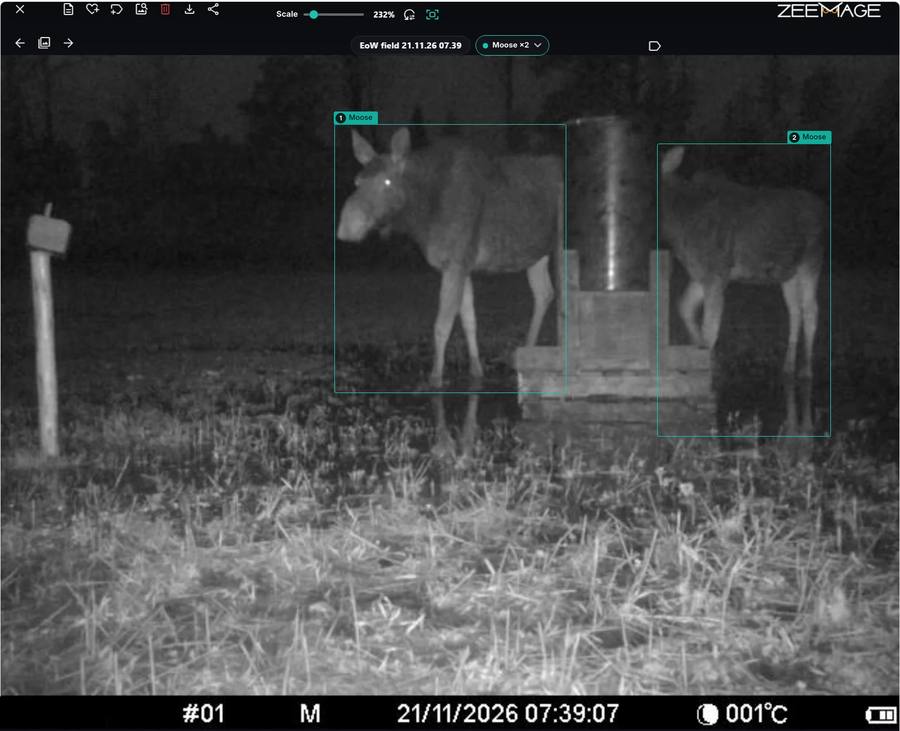
Zeemage is a cloud service that runs in the browser, receives the pictures that trail and security cameras send by email or MMS, and collects them in one gallery. The camera sends its pictures to a feed email address given by Zeemage, just as it would to any email address.
Which cameras work and how to connect them · Pricing · How Zeemage works
How does Zeemage relate to the questions in this guide?
| Question in this guide | In Zeemage |
|---|---|
| Which address does the camera send to? | Your feed email address. You find it under Settings > Camera settings. |
| Must the camera's way of sending change? | No. You add the feed email address as a recipient to the current settings. |
| Is an app password needed? | No, if the camera sends through Zeemage's own SMTP server. |
| Do the pictures go to spam? | No. The pictures do not pass through your mailbox. |
| Is a new SIM card or an app needed? | No. The camera keeps its plan, and Zeemage runs in the browser. |
| Do cameras of different brands work? | Yes. All your cameras show in the same gallery, by camera and time. |
| How do I share pictures with others? | You share the cameras with your friends as a group. No new recipients are added to the camera. |
Zeemage SMTP server settings
Use Zeemage's own server when Zeemage is the camera's only recipient, or when a new camera has no mail server set. The server does not forward messages: it delivers pictures only to Zeemage. If you want the pictures in your own email too, keep the camera's current server and add the feed email address as a recipient.
- Setting
- Value
- Email address
- •••••••••••••This is the camera feed email address given to you by Zeemage. The camera sends images to this address.
- Sender address
- Can be left empty, or any email address of your choiceThe sender address is not checked — the camera is identified by the feed email address it sends to.
- Server name
- •••••••••••
- Port
- 587 (STARTTLS, recommended) or 465 (SSL/TLS)
- SSL/TLS
- On — required. TLS 1.0 or newer accepted, so older cameras work too
- User
- •••••••••••
- Password
- ••••••••
The exact values are hidden from address-harvesting bots — one click shows them. Unencrypted sending (port 25) is not supported.
Pictures for friends and the hunting club
Don't add a dozen recipients to the camera. Send the pictures to Zeemage, and share the cameras with a group. Each member needs their own Zeemage account, and it can be the free one. Shared pictures count toward each member's own limits. With a paid plan, you can also send a share link to someone without an account.
What does Zeemage cost?
The first month is free with all features, and no payment card is needed. After that BASIC is free: 1 000 images a month and 500 MB of storage. Paid plans with automatic object detection, image enhancement and share links start at 5 € a month or 40 € for 12 months. No plan limits the number of cameras.
Sources
The facts in this guide were checked against the sources below on 23 November 2026. The sources are official pages of authorities and services, or independent pages.
- Google Account Help: Sign in with app passwords
- Google Workspace Admin Help: Send email from a printer, scanner, or app
- Gmail Help: Email sender guidelines FAQ
- Gmail Help: Report spam in Gmail
- Gmail Help: Automatically forward Gmail messages to another account
- FCC: Plan Ahead for Phase Out of 3G Cellular Networks and Service
- Traficom (Finland): Development of Finnish mobile networks
- TrailCamPro: Alkaline Battery Capacity Test (Cold Weather & High Current)